
GTO Wizard Trainer: Drill Settings & 3 Recommended Presets
A complete guide to setting up drills in GTO Wizard's Trainer. Learn how to create drills, configure each of the 5 setting tabs, and import 3 ready-to-use drill presets.
📝 Where this article fits: A trainer setup guide for those looking to practice with GTO Wizard in a hands-on format. Reading How to Use GTO Wizard and GTO Wizard Pricing & Registration first will help.
Ever find yourself staring at range charts and wondering, "Do I actually understand this?" GTO Wizard's Trainer lets you practice by choosing actions in real-time scenarios and instantly seeing whether your decisions deviate from equilibrium. This article covers how to create drills, explains each setting in detail, and shares 3 recommended drill presets you can import right away.
What You'll Learn
- How to create a drill step by step
- What each setting does across the Game, Board, Hand, Mode, and Display tabs
- 3 recommended drill presets with importable text
How to Create a GTO Wizard Drill
Creating a drill takes just 5 steps.
- Navigate — From the top navigation bar, click "Practice" → "Drills."
- Create new — Click "New" at the top of the page.
- Configure — Adjust the settings to match what you want to train (details below).
- Save — Click "Save" at the bottom of the window.
- Name it — Give your drill a name and click "Save" again. Optionally add a description so you can remember what the drill is for later.
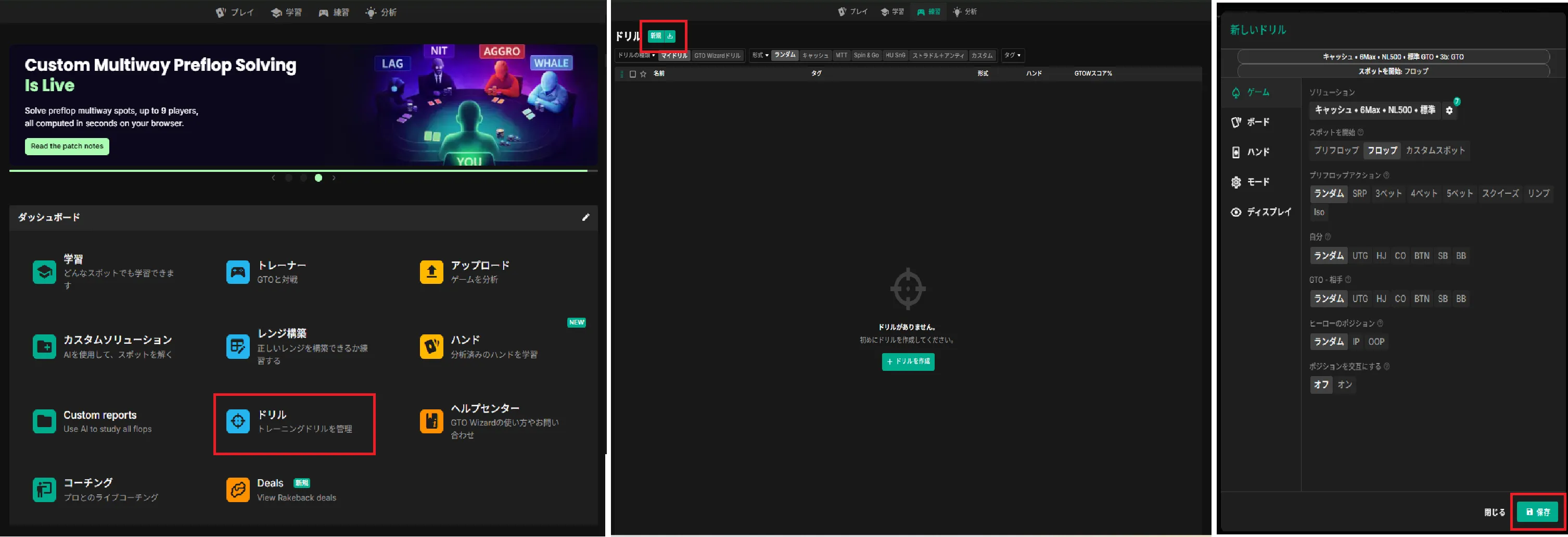
GTO Wizard Drill Settings
The drill settings screen has 5 tabs: Game, Board, Hand, Mode, and Display. Here's what each setting does and our recommended configuration.
Game Tab
The Game tab determines which situations you'll practice.
| Setting | Description | Recommended |
|---|---|---|
| Solutions | Affects ranges and bet sizes. Choose based on the scenario you want to study. | See below |
| Start spot | Which point in the hand to begin. | Preflop |
| Preflop action | The preflop situation to practice. | Start of hand or Random |
| Hero | Your position. Multiple selections allowed. | Random |
| GTO-Villain | Opponent's position. Multiple selections allowed. | Random |
| Hero's position | Relative position between you and the opponent. When positions are set to Random or multiple, you can lock to IP (in position) or OOP (out of position). | Random |
| Alternate positions | Alternates the configured positions between hands. | Off |
Recommended Solutions settings
- Solutions: Cash
- Type: Classic
- Players: 6-max
- Spot: Postflop included
- Type: Standard
- Rake: NL50
- Open size: GTO
- 3-bet size: GTO
- Effective stack: 100
Board Tab
The Board tab lets you filter the flop, turn, and river card conditions. Use this when you want to focus on specific board textures.
| Setting | Description | Recommended |
|---|---|---|
| Specific board | Restricts the board to specific cards. | None |
| Suits | Limits the suits that appear on the board. | Random |
| Paired | Whether the board contains a pair. "Trips" means all three cards share the same rank. | Random |
| Connectedness | How close the board card ranks are to each other. | Random |
| Subset | Limits the types of flops used in practice. | Random |
| Highest / Middle / Lowest card | Restricts flop card ranks. Multiple selections allowed. | Random |
| Card (Turn / River) | Restricts the rank height of turn and river cards. | Random |
Hand Tab
We recommend keeping the default settings so that all hands are dealt.
| Setting | Description |
|---|---|
| Manual | Choose which hands are dealt — by hand strength or from a range. |
| Hand class | Hands are dealt based on the board. |
| Close decisions | Deals hands where multiple actions have similar EV. Great for sharpening your judgment. |
Mode Tab
The Mode tab fine-tunes your practice style.
| Setting | Description | Recommended |
|---|---|---|
| Tables | Increasing the number lets you train multiple tables simultaneously. | 1 |
| Game mode | How far you play each hand. | All hands |
| Difficulty | Controls the action options shown. | Grouped |
| Input mode | How you submit your answer. | Actions |
| Pause after hand | Whether results are displayed after each hand. | Off |
| Game speed | Speed of the opponent's play. | Turbo |
| Auto new hand | Time until the next hand is dealt. Useful when training on multiple tables. | Off |
| RNG mode | Displays a random number from 1–100 for training frequency-based decisions. In Low RNG, lower numbers correspond to aggressive actions; in High RNG, higher numbers correspond to aggressive actions. For example, with a hand that bets 25% and checks 75%, if the RNG shows 15: Low RNG = bet, High RNG = check. | Low RNG or High RNG |
| Learning mode | Displays an information panel during play. | Off |
| Time bank | Sets a thinking time limit during play. | Off |
| Session | Number of hands to play. Setting a fixed number helps you track progress. | Up to you |
Display Tab
The Display tab controls what information appears during practice. We recommend turning off anything that gives away the answer.
| Setting | Description | Recommended |
|---|---|---|
| Show hints | Displays action frequencies on the options (essentially the answer). | Off |
| Show instant results | Shows immediately whether your answer was correct. | On |
| Show streak icon | Displays consecutive correct/incorrect counts. | Up to you |
| Show RNG icon | Displays the random number used for RNG mode answers. | On if RNG mode is enabled in the Mode tab |
| Show hero's range, etc. | Displays various range information. Since this is essentially the answer, we recommend turning it off. | Off |
3 Recommended GTO Wizard Drill Presets
Here are 3 drill presets recommended by Nogard, who runs the SeekerStart Discord community.
Each drill includes importable text below. Copy and paste it using the "Import Drill" button on GTO Wizard's drill screen.
Preflop Fundamentals
A timed drill where you answer preflop actions. Aim to consistently score 90% or above on your GTOW Score (GTO Wizard's accuracy metric) over 50 hands. Once comfortable, try increasing the table count to 2 or more so preflop ranges come to mind instantly.
Key settings
- Solutions: Recommended settings above
- Game: See images below
- Board: Default
- Hand: Default
- Mode: See images below
- Display: "Show instant results" on
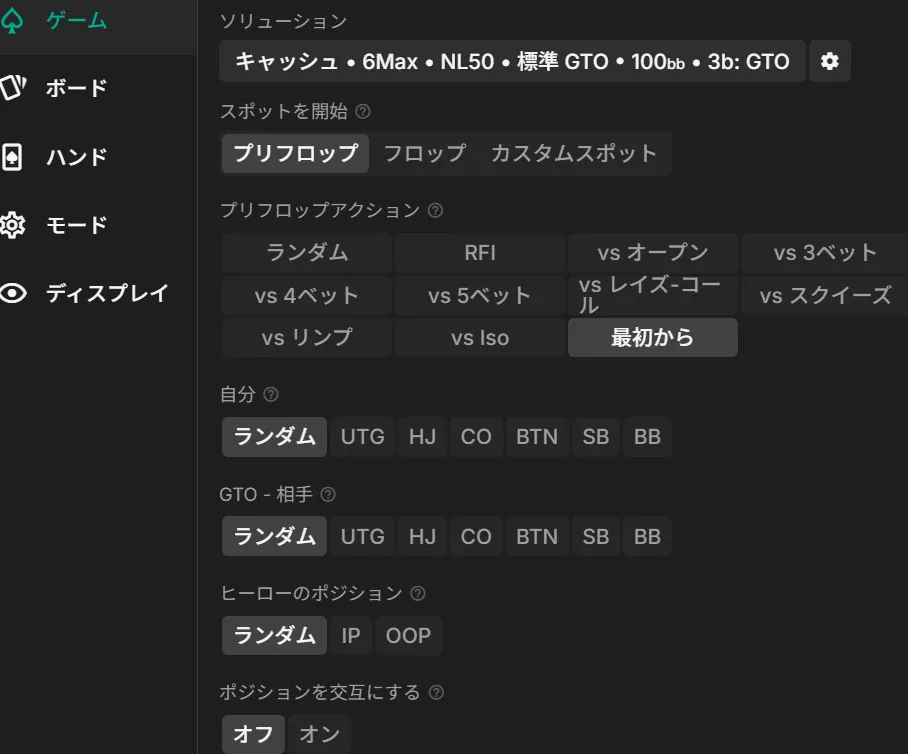
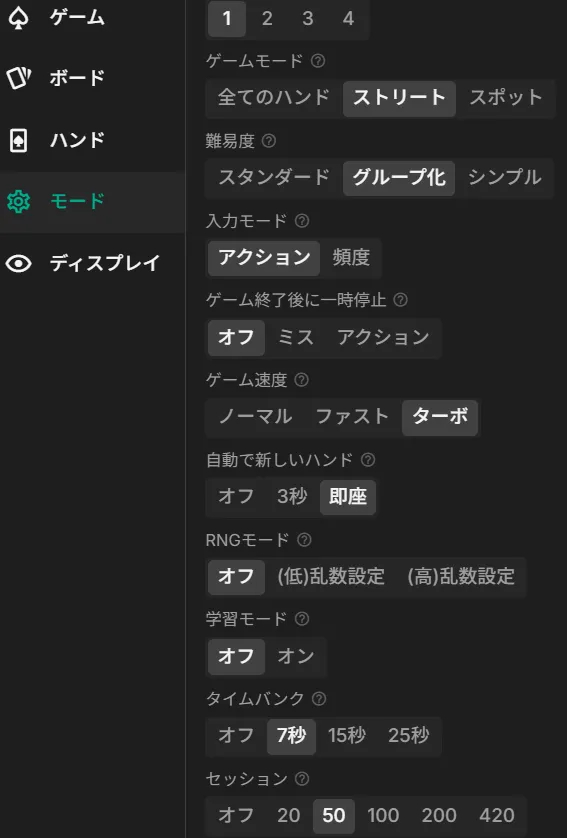
Import text (click to reveal)
All-Street Fundamentals
A drill where you play every hand through to the river, practicing the full preflop-to-river flow.
This preset uses Low RNG, meaning lower numbers correspond to more aggressive actions. Switch to High RNG if that feels more intuitive to you.
Key settings
- Solutions: Recommended settings above
- Game: See images below
- Board: Default
- Hand: Default
- Mode: See images below
- Display: "Show instant results" and "Show RNG icon" on
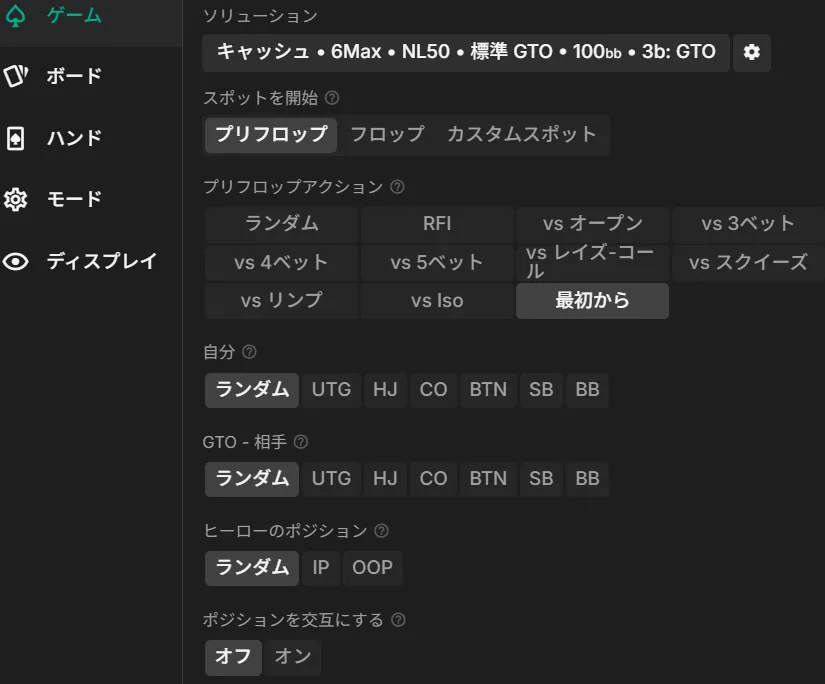
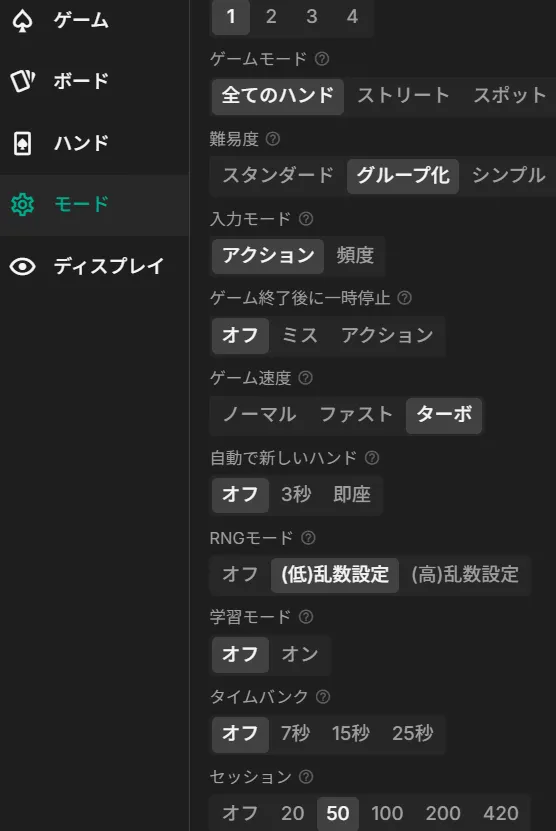
Import text (click to reveal)
BTN vs BB Postflop Intensive
A drill starting from the flop that alternates BTN vs BB spots. This is the most common heads-up scenario in cash games, making it ideal for focused practice.
Pay close attention to how the preflop action played out before each flop. Feel free to change the RNG setting to your preference.
Key settings
- Solutions: Recommended settings above
- Game: See images below
- Board: Default
- Hand: Default
- Mode: See images below
- Display: "Show instant results" and "Show RNG icon" on
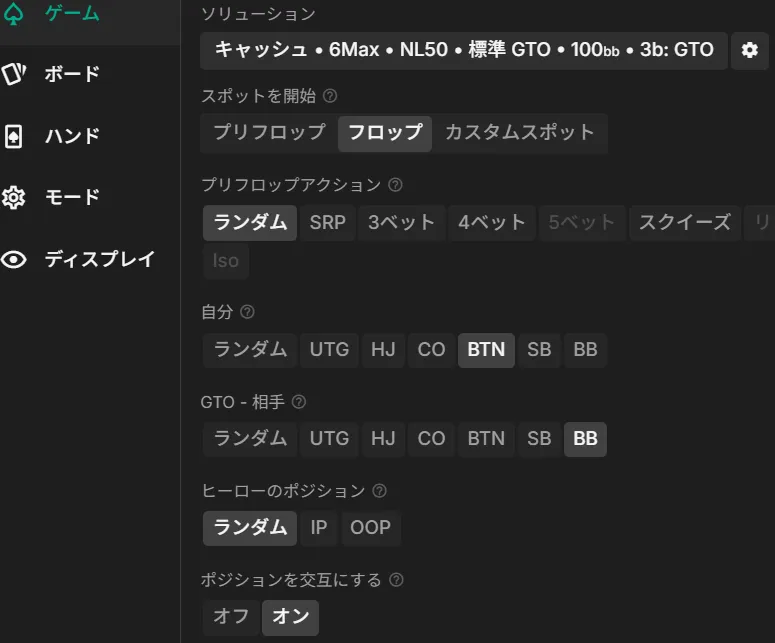
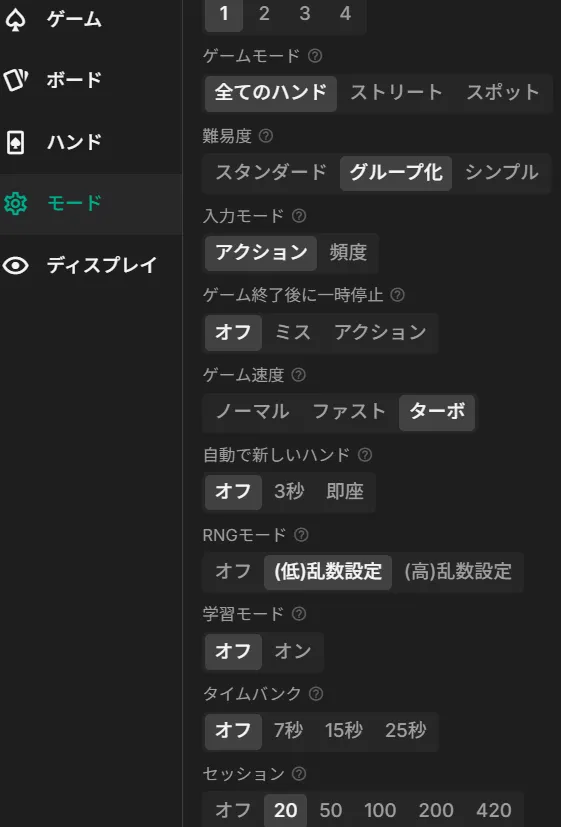
Import text (click to reveal)
Summary
🎯 Key Takeaways
- Create GTO Wizard drills from "Practice" → "Drills" → "New"
- There are 5 setting tabs: Game, Board, Hand, Mode, and Display. Each lets you fine-tune the scenarios and conditions for practice
- Turn off answer-revealing options like "Show hints" and "Show hero's range" to train your own decision-making
- Use RNG mode to practice frequency-based actions with random numbers
- Start with Preflop Fundamentals, then move on to All-Street and BTN vs BB drills as you improve
Import the drill presets by copying and pasting the text into GTO Wizard — you'll be up and running in seconds. Customize them to match your level and goals, and make drills part of your daily practice routine.
Found this helpful?
Bookmark this page to revisit anytime!
Ctrl+D (Mac: ⌘+D)
Found an error or have a question about this article? Let us know.
✉️ Contact Us
This article includes solution screens from GTO Wizard. Copyright in those figures belongs to GTO Wizard.